GUARDIAN-EOS
ergonomic office Software


Guardian-EOS™ Ergonomic Office Software
Intelligent Movement & Recovery Prompts
Guardian Ergonomic Office Software is designed to help computer users avoid an overuse injury by suggesting rest breaks based on the measured ‘Strain’ from keyboard and mouse use.
Guardian-EOS™ is ergonomic office software designed to help computer users manage prolonged keyboard and mouse activity through intelligently timed recovery breaks, movement prompts and guided stretches.
Unlike a simple countdown timer, Guardian-EOS™ considers keyboard and mouse workload and suggests a break according to work intensity and accumulated strain.
What is Guardian EOS™?
Guardian Ergonomic Office Software is designed to help computer users avoid an overuse injury by suggesting rest breaks based on the ‘Strain’ from keyboard and mouse use.
Among many other features, Guardian-EOS™ also includes sophisticated reporting tools that allow WHS and HR staff to identify people at risk of a workstation overuse injury - before it occurs.
 Break Suggestions
Suggests a break based on work intensity or strain and not on time spent at computer
Video Stretches
Video stretches guide users to stretch during a break
User Analytics
Powerful user analytics for easy WHS / HR reporting
Strain Based Model
Guardian-eos is a ‘strain-based’ model that accounts for natural rest and we’ll set the ‘Maximum Time between Breaks’ to 45 minutes as well. Instead just managing time, Guardian is also managing ‘strain’ from keyboard and mouse usage.
The strain level required to trigger a break is based on information you tell Guardian about your computing health AND your own usage pattern.

Natural Rest
Natural rest taken before the 45 minutes is up will stop the clock and if you rest long enough, the clock resets. Now let’s assume continuous use for 45 minutes without a natural rest break.

Low Strain
Natural rest taken before the 45 minutes is up will stop the clock and if you rest long enough, the clock resets. Now let’s assume continuous use for 45 minutes without a natural rest break.

High Strain
Natural rest taken before the 45 minutes is up will stop the clock and if you rest long enough, the clock resets. Now let’s assume continuous use for 45 minutes without a natural rest break.

Overuse Injury
Natural rest taken before the 45 minutes is up will stop the clock and if you rest long enough, the clock resets. Now let’s assume continuous use for 45 minutes without a natural rest break.
.png)
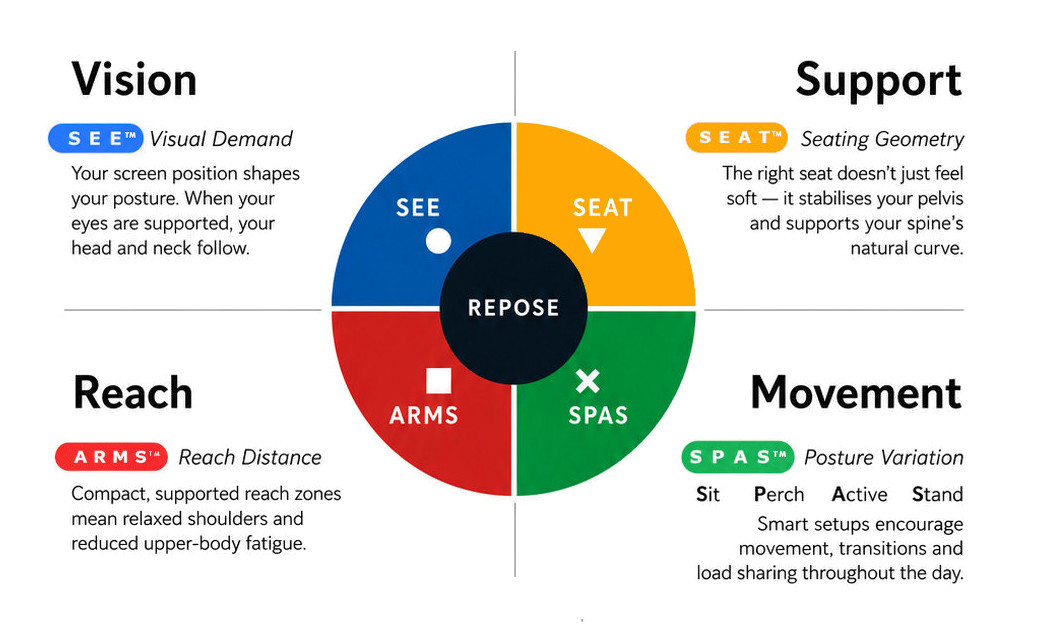
What this means for you when the 4 elements are aligned
| Corrected screen alignment → reduced neck strain |  - S E E™ - S E E™ |
| Better pelvic support → less lower back fatigue |  - S E A T™ - S E A T™ |
| Arm positioning → reduced shoulder load |  - A R M S™ - A R M S™ |
| Movement support → reduces static load |  - S P A S™ - S P A S™ |
.png)
R E P O S E™ Outcome
Guardian-EOS™ reinforces an important principle of Natural R E P O S E™:
Good ergonomics is not maintaining one “correct” posture - it is having a well-configured workstation and moving away from static posture regularly.
Furniture establishes the working environment.
Guardian-EOS™ helps establish the behaviour.
GUARDIAN-EOS
- break suggestions based on work intensity and strain
- monitors keyboard and mouse activity independently
- personalised user profile
- guided video stretches with optional audio
- tools designed to reduce repetitive input strain
- workplace reporting capabilities
- configurable for individual and organisational use
Who Is It For?
Suitable for:
- office workers spending extended periods at a computer
- keyboard and mouse-intensive roles
- government and commercial workplaces
- administrative, professional and technical environments
- users who become absorbed in tasks and forget to move
- organisations wanting a systematic approach to encouraging movement and recovery during computer work
Problem to Solve
Office work can involve long periods of concentrated screen, keyboard and mouse activity with very little natural interruption.
Even a well-configured ergonomic workstation cannot remove the need for movement, posture variation and recovery.
Guardian-EOS™ helps interrupt prolonged static work by recognising computer activity and prompting a break when recovery is appropriate — rather than relying solely on a fixed timer.
Key Features
- break suggestions based on work intensity and strain
- monitors keyboard and mouse activity independently
- personalised user profile
- guided video stretches with optional audio
- tools designed to reduce repetitive input strain
- workplace reporting capabilities
- configurable for individual and organisational use
S P A S™ — Primary
Sit · Perch · Active · Stand
Guardian-EOS™ supports S P A S™ by introducing movement and recovery into computer-based work.
It helps users:
- interrupt prolonged static sitting
- change posture during the workday
- stand, stretch or move between concentrated tasks
- introduce short recovery periods after intensive keyboard or mouse work
- build greater awareness of movement as part of normal workstation behaviour
A R M S™ — Secondary
Arm Support · Reach · Mouse · Surface
Because Guardian-EOS™ distinguishes between keyboard and mouse activity, it also supports A R M S™ by identifying periods of concentrated upper-limb input and encouraging appropriate recovery.
1 - 19 Users
20 + Users
Workforce Pricing Enquiry - Here.
Guardian-EOS™ Ergonomic Office Software
Intelligent Movement & Recovery Prompts
Guardian Ergonomic Office Software is designed to help computer users avoid an overuse injury by suggesting rest breaks based on the measured ‘Strain’ from keyboard and mouse use.
Guardian-EOS™ is ergonomic office software designed to help computer users manage prolonged keyboard and mouse activity through intelligently timed recovery breaks, movement prompts and guided stretches.
Unlike a simple countdown timer, Guardian-EOS™ considers keyboard and mouse workload and suggests a break according to work intensity and accumulated strain.
What is Guardian EOS™?
Guardian Ergonomic Office Software is designed to help computer users avoid an overuse injury by suggesting rest breaks based on the ‘Strain’ from keyboard and mouse use.
Among many other features, Guardian-EOS™ also includes sophisticated reporting tools that allow WHS and HR staff to identify people at risk of a workstation overuse injury - before it occurs.
Break Suggestions
Suggests a break based on work intensity or strain and not on time spent at computer
Video Stretches
Video stretches guide users to stretch during a break
User Analytics
Powerful user analytics for easy WHS / HR reporting
Strain Based Model
Guardian-eos is a ‘strain-based’ model that accounts for natural rest and we’ll set the ‘Maximum Time between Breaks’ to 45 minutes as well. Instead just managing time, Guardian is also managing ‘strain’ from keyboard and mouse usage.
The strain level required to trigger a break is based on information you tell Guardian about your computing health AND your own usage pattern.
Natural Rest
Natural rest taken before the 45 minutes is up will stop the clock and if you rest long enough, the clock resets. Now let’s assume continuous use for 45 minutes without a natural rest break.
Low Strain
Natural rest taken before the 45 minutes is up will stop the clock and if you rest long enough, the clock resets. Now let’s assume continuous use for 45 minutes without a natural rest break.
High Strain
Natural rest taken before the 45 minutes is up will stop the clock and if you rest long enough, the clock resets. Now let’s assume continuous use for 45 minutes without a natural rest break.
Overuse Injury
Natural rest taken before the 45 minutes is up will stop the clock and if you rest long enough, the clock resets. Now let’s assume continuous use for 45 minutes without a natural rest break.
What this means for you when the 4 elements are aligned
| Corrected screen alignment → reduced neck strain | - S E E™ |
| Better pelvic support → less lower back fatigue | - S E A T™ |
| Arm positioning → reduced shoulder load | - A R M S™ |
| Movement support → reduces static load | - S P A S™ |
R E P O S E™ Outcome
Guardian-EOS™ reinforces an important principle of Natural R E P O S E™:
Good ergonomics is not maintaining one “correct” posture - it is having a well-configured workstation and moving away from static posture regularly.
Furniture establishes the working environment.
Guardian-EOS™ helps establish the behaviour.