Kinesis Freestyle 2 Split Keyboard
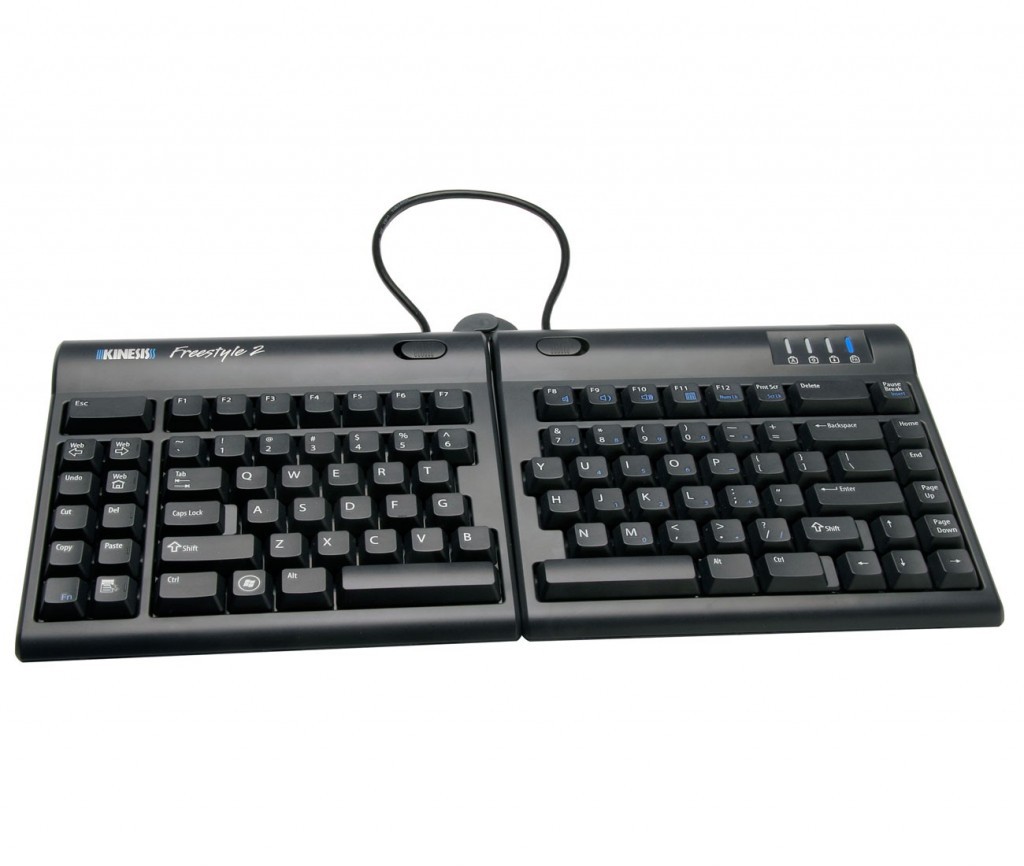
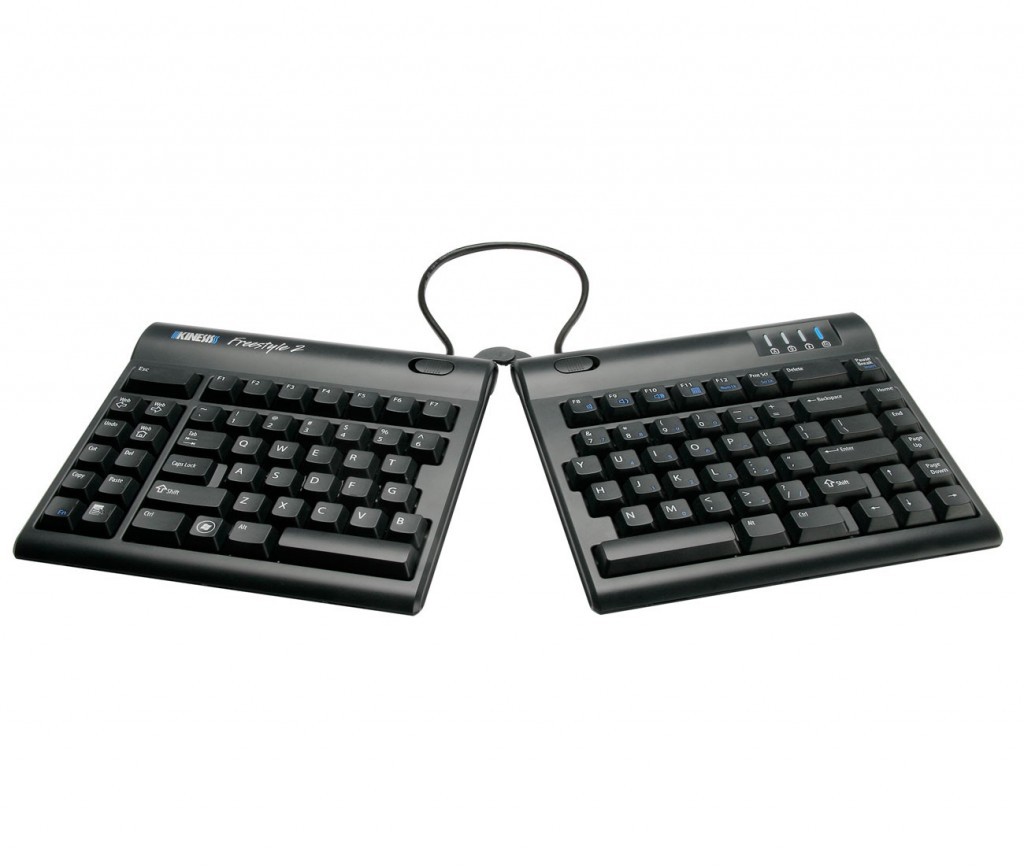
Kinesis Freestyle2 Adjustable Split Keyboard
Split Keyboard — Adjusted to the User
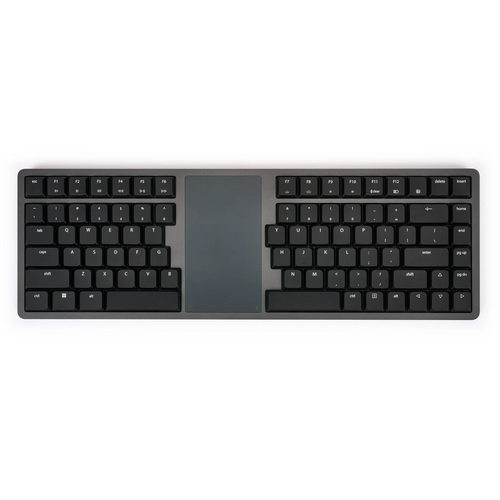
The Kinesis Freestyle2 is a compact split keyboard designed to let each user position the keyboard around their shoulder width, forearm angle and preferred typing position.
The two keyboard modules can remain together, be splayed outward, or separated to create a more individual working position.
Most keyboards including ergonomic models have a 10 degree positive slope from front to back. These designs tend to bend your wrists. The Freestyle2 has a zero degree slope which minimizes the height, effectively creating negative slope and reducing wrist extension. The slim design provides you a 2-in-1 office and travel keyboard.
From small to tall and body types in between, the Freestyle2 allows for maximum flexibility catering to each individual’s unique needs. Out of the box both modules are connected together by a flexible pivot tether allowing an infinite range of splay. Disconnecting the pivot tether allows up to 228mm of complete separation of both left and right keying modules. Perfect for individual needs ranging from a narrow footprint to complete separation. This design greatly reduces and or/eliminates ulnar deviation.
Teamed with the VIP kit and the Kinesis Low Force Key pad, the Kinesis Freestyle will provide you with the perfect start to an ergonomic workstation.
Driverless hot keys for commonly used mouse actions. (Internet Page Forward and Back, Undo, Web Home, Cut, Copy and Paste). A vertical rib is located on the inside row of hot keys to provide tactile notification to the user.
Windows 2000, XP, Vista, Windows 7, Windows 8 & Windows 10Linux. Except for the embedded multimedia and calculater keys which are inoperational
Key Features
- Kinesis Freestyle2 split-adjustable keyboard
- standard model provides up to 9" / 229 mm module separation
- optional 20" / 508 mm linking-cable version
- compact tenkeyless layout
- PC USB version includes embedded numeric keypad function
- low-force tactile membrane switches
- approximately 35 g activation force
- approximately 3.9 mm key travel
- zero-degree keyboard slope
- standard keyboard approximately 391 W × 181 D × 22 H mm when modules are together
- 8 office shortcut keys
- wired USB and selected Bluetooth configurations available
- Windows, Mac and Linux configurations available
- optional V3 tenting kit
- optional VIP3 tenting + palm supports
- optional Ascent high-tenting system
- 2-year manufacturer warranty
- ergonomicoffice SKU: KINFREE
.png)
.png)
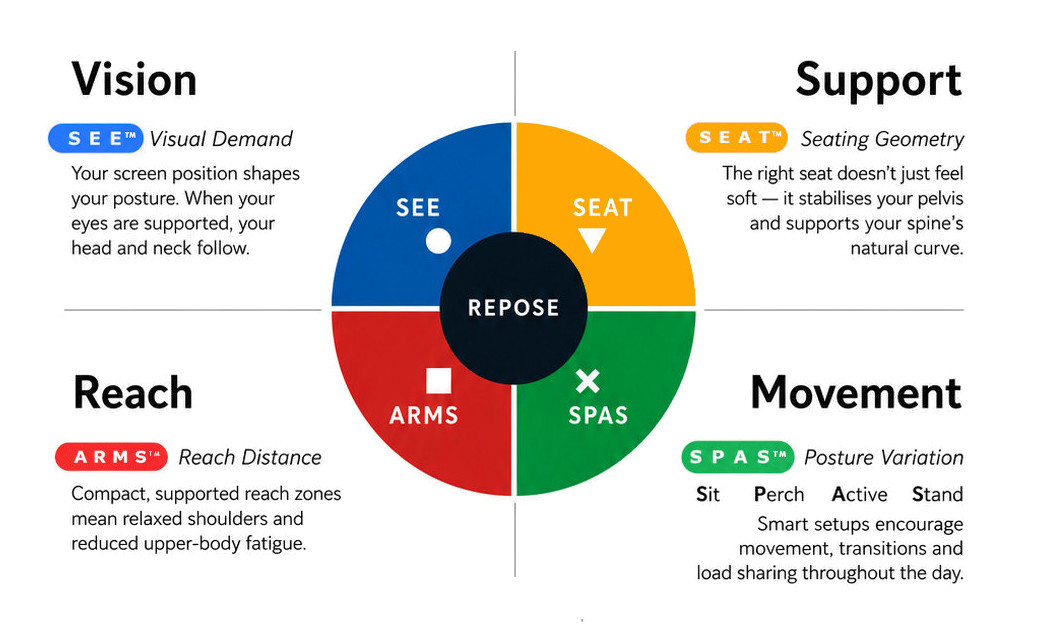
What this means for you when the 4 elements are aligned
| Corrected screen alignment → reduced neck strain |  - S E E™ - S E E™ |
| Better pelvic support → less lower back fatigue |  - S E A T™ - S E A T™ |
| Arm positioning → reduced shoulder load |  - A R M S™ - A R M S™ |
| Movement support → reduces static load |  - S P A S™ - S P A S™ |
R E P O S E™ Outcome
The Kinesis Freestyle2 supports Natural R E P O S E™ by allowing the keyboard position to adapt to the person rather than requiring the person to adapt to the keyboard.
Separate. Splay. Align.
- 390mm Wide
- 184mm Deep
- 22mm High
- Weight 885 grams
- Split Keyboard
Warranty Period: 12 Months
Kinesis Freestyle 2 Split Keyboard

- true two-piece split keyboard
- adjustable separation and splay
- compact tenkeyless layout
- low-force membrane keys
- low-profile zero-degree slope
- optional tenting and palm-support accessories
Who Is It For?
Suitable for users who:
- find conventional straight keyboards restrictive
- want greater control over hand and forearm alignment
- experience excessive inward wrist angling when typing
- have broader shoulders or prefer their hands positioned further apart
- use a mouse frequently and benefit from a compact keyboard
- require an individually configurable ergonomic workstation
Problem to Solve
A conventional keyboard brings both hands together into one fixed position, which may cause the wrists to angle outward from the forearms.
The Freestyle2 allows the two halves to be separated and splayed, helping the keyboard follow the natural direction of the forearms rather than forcing the hands around a fixed keyboard.
Its compact, numeric-keypad-free layout also allows the mouse to be positioned closer to the body.
A R M S™ — Primary
Reach & Interface
The Freestyle2 supports A R M S™ by helping users:
- align the keyboard more closely with the forearms
- reduce excessive wrist deviation
- adjust keyboard separation to shoulder width
- keep the mouse closer to the working centreline
- configure the primary interface around the individual
Optional tenting accessories can also raise the inner edges of the keyboard to reduce sustained palm-down forearm positioning.
Kinesis Freestyle2 Adjustable Split Keyboard
Split Keyboard — Adjusted to the User
The Kinesis Freestyle2 is a compact split keyboard designed to let each user position the keyboard around their shoulder width, forearm angle and preferred typing position.
The two keyboard modules can remain together, be splayed outward, or separated to create a more individual working position.
Most keyboards including ergonomic models have a 10 degree positive slope from front to back. These designs tend to bend your wrists. The Freestyle2 has a zero degree slope which minimizes the height, effectively creating negative slope and reducing wrist extension. The slim design provides you a 2-in-1 office and travel keyboard.
From small to tall and body types in between, the Freestyle2 allows for maximum flexibility catering to each individual’s unique needs. Out of the box both modules are connected together by a flexible pivot tether allowing an infinite range of splay. Disconnecting the pivot tether allows up to 228mm of complete separation of both left and right keying modules. Perfect for individual needs ranging from a narrow footprint to complete separation. This design greatly reduces and or/eliminates ulnar deviation.
Teamed with the VIP kit and the Kinesis Low Force Key pad, the Kinesis Freestyle will provide you with the perfect start to an ergonomic workstation.
Driverless hot keys for commonly used mouse actions. (Internet Page Forward and Back, Undo, Web Home, Cut, Copy and Paste). A vertical rib is located on the inside row of hot keys to provide tactile notification to the user.
Windows 2000, XP, Vista, Windows 7, Windows 8 & Windows 10Linux. Except for the embedded multimedia and calculater keys which are inoperational
Key Features
- Kinesis Freestyle2 split-adjustable keyboard
- standard model provides up to 9" / 229 mm module separation
- optional 20" / 508 mm linking-cable version
- compact tenkeyless layout
- PC USB version includes embedded numeric keypad function
- low-force tactile membrane switches
- approximately 35 g activation force
- approximately 3.9 mm key travel
- zero-degree keyboard slope
- standard keyboard approximately 391 W × 181 D × 22 H mm when modules are together
- 8 office shortcut keys
- wired USB and selected Bluetooth configurations available
- Windows, Mac and Linux configurations available
- optional V3 tenting kit
- optional VIP3 tenting + palm supports
- optional Ascent high-tenting system
- 2-year manufacturer warranty
- ergonomicoffice SKU: KINFREE
What this means for you when the 4 elements are aligned
| Corrected screen alignment → reduced neck strain | - S E E™ |
| Better pelvic support → less lower back fatigue | - S E A T™ |
| Arm positioning → reduced shoulder load | - A R M S™ |
| Movement support → reduces static load | - S P A S™ |
R E P O S E™ Outcome
The Kinesis Freestyle2 supports Natural R E P O S E™ by allowing the keyboard position to adapt to the person rather than requiring the person to adapt to the keyboard.
Separate. Splay. Align.
- 390mm Wide
- 184mm Deep
- 22mm High
- Weight 885 grams
- Split Keyboard
Warranty Period: 12 Months